
R
0 downloads
0 likes
8 views
✦ EnderHavenDungeon ✦
Instanced MythicMobs Dungeon System
Paper • MythicMobs • Java & Bedrock • Solo Instances • Party System
About
EnderHavenDungeon is a complete GUI and wand-based dungeon system for Paper servers.
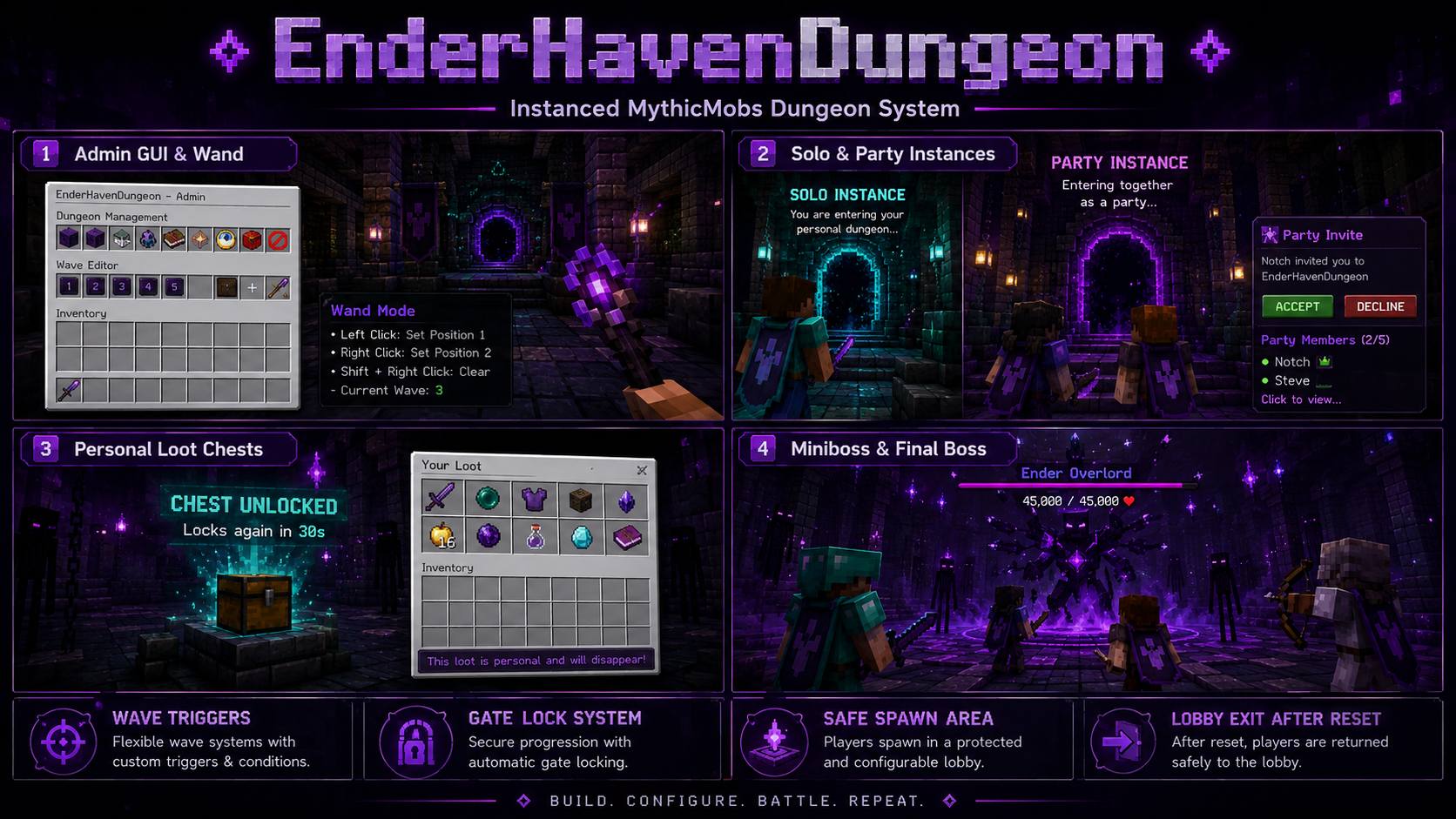
Every solo player receives a separate dungeon world instance with independent waves, mobs, gates, chests, holograms, bossbars, timers, and progress.
Players can also create a party and enter the same dungeon instance together through the built-in invite system.
Each party member still receives personal randomized chest rewards.
Dependencies
Required
- Paper or a compatible Paper fork.
- MythicMobs for regular mobs, minibosses, and final bosses.
Optional
- Multiverse-Core for importing and accessing template worlds.
- LuckPerms for permission management.
- Geyser for Bedrock Edition support.
- Floodgate for Bedrock players without Java accounts.
- ViaVersion when the Geyser protocol differs from the backend version.
Bedrock support is provided through Geyser and Floodgate.
EnderHavenDungeon is not a native Bedrock Dedicated Server plugin.
Features
Instances
- Every solo player receives a separate dungeon world.
- Solo players cannot see or affect each other.
- Every instance has independent:
- Waves
- MythicMobs
- Gates
- Loot chests
- Holograms
- Bossbars
- Timers
- Progress
- Temporary instance worlds are deleted after completion or reset.
- The original dungeon world remains as the template.
Parties
- Create a party.
- Invite online players.
- Accept or decline invitations.
- Promote another member to host.
- Kick members.
- Leave or disband the party.
- Party members enter the same dungeon instance.
- Only the host starts the dungeon.
- Party changes are blocked while inside a dungeon.
- Late joining is blocked while a party is already playing.
Admin GUI
- Chest-based admin menu.
- Anvil GUI text and number inputs.
- Create and delete dungeons.
- Rename dungeons and waves.
- Configure start and exit locations.
- Configure safe areas.
- Add multiple waves.
- Add multiple MythicMob spawn points.
- Configure gates and loot chests.
- Validate dungeons and waves.
- Pagination for dungeons, waves, gates, and spawn points.
Wand
The Dungeon Wand can select:
- Safe areas
- Wave trigger regions
- Gate regions
Left Click  = Position 1
Right Click = Position 2
Waves
- Multiple configurable waves.
- Separate detection region for each wave.
- Mobs spawn only when a participant enters the trigger.
- Multiple mob spawn points in one wave.
- Different MythicMob IDs at every spawn point.
- Configurable amount and MythicMobs level.
- The next wave remains locked until the current wave is complete.
Mob Roles
Each spawn point supports one of these roles:
WAVE        = Regular dungeon mob
MINIBOSS    = Miniboss with bossbar, EXP, and death effects
FINAL_BOSS  = Final boss with enhanced effects and EXP
Each spawn point supports:
- MythicMob ID
- Amount
- Level
- Role
- Death EXP
- Spawn location
Bossbars
- Appears immediately when a miniboss or final boss spawns.
- Does not require the boss to be attacked first.
- Displays:
- Boss name
- Current health
- Maximum health
- Updates health in real time.
- Separate colors and styles for minibosses and final bosses.
- Supports multiple active bosses.
- Automatically removed when:
- The boss dies
- The player leaves
- The dungeon resets
- The instance closes
- The server shuts down
Gates
- Gates use
IRON_BARSby default. - Gates remain closed while a wave is active.
- Gates open after all mobs in the wave are defeated.
- Each gate can:
- Close again when the next wave starts.
- Remain permanently open.
- Useful for miniboss gates that should not close again.
- Gates are protected from:
- Block breaking
- Block placement
- Pistons
- Explosions
Safe Area
The safe area can:
- Prevent incoming damage.
- Prevent players from attacking outside the area.
- Prevent dungeon mobs from targeting protected players.
- Protect players before the first wave begins.
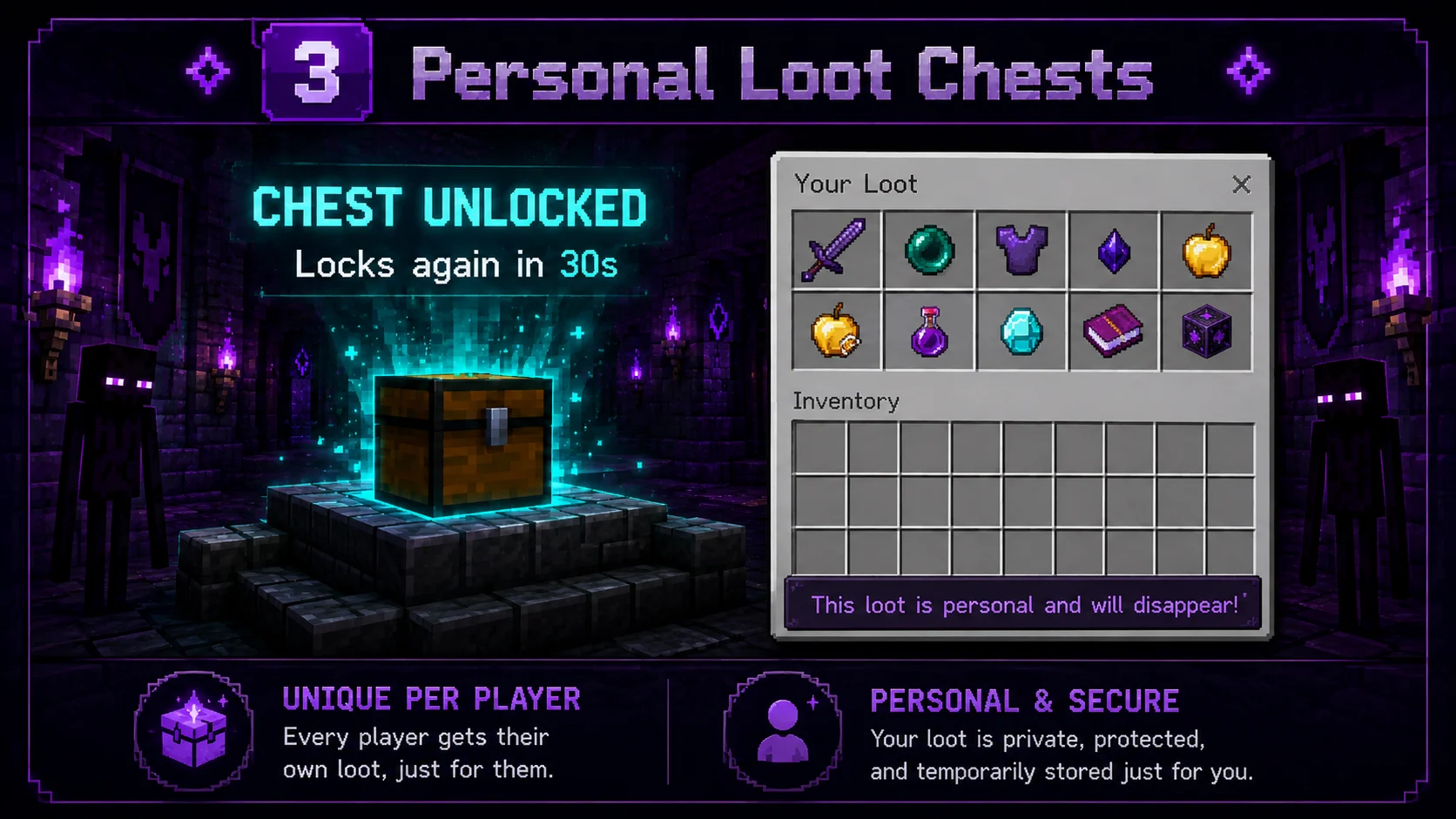
Loot Chests
- Every wave can have a different chest.
- Loot is generated separately for every player.
- Players do not share the same loot inventory.
- Every player can claim each wave chest only once.
- Configurable reward rolls.
- Configurable chest duration.
- Unclaimed rewards expire when the timer ends.
- The loot GUI closes automatically when the chest locks.
Example:
Player A:
- Diamond
- Golden Apple
- Reward Key

Player B:
- Emerald
- Experience Bottle
- Netherite Scrap
Holograms
Locked chest:
CHEST LOCKED
Complete the wave to unlock
Unlocked chest:
CHEST UNLOCKED
Locks again in 30s
The plugin removes old and duplicate holograms when the chest state changes.
Boss Effects
Minibosses and final bosses can produce:
- Configurable death EXP.
- Ender Dragon-style sounds.
- Lightning effects.
- Portal particles.
- Dragon breath particles.
- Totem particles.
- Stronger final boss animations.
Reset
Players are safely teleported to the configured exit when:
- The final wave is completed.
- The final chest timer ends.
- An administrator resets the dungeon.
- A player uses
/ehd leave. - An instance fails to load.
- The instance is being unloaded.
- The server shuts down.
The exit may be in another world, such as:
lobby
Cleanup flow:
Close Loot GUIs
→ Remove Bossbars
→ Remove Mobs
→ Remove Holograms
→ Unload Instance World
→ Delete Temporary Instance
Performance
- Asynchronous world copying.
- Serialized world-copy queue.
- Asynchronous Paper chunk preloading.
- Configurable preload timeout.
- Configurable maximum active instances.
- Plugin chunk tickets while instances are active.
- No synchronous chunk-load fallback.
- Configurable mob and gate limits.
- Invalid Axiom gamerules are removed from copied instances.
Flow
Player Joins
→ Copy Template World
→ Sanitize Metadata
→ Preload Chunks
→ Teleport Player or Party
→ Enter Wave Trigger
→ Spawn MythicMobs
→ Defeat Wave
→ Open Personal Loot
→ Continue to Next Wave
→ Defeat Final Boss
→ Claim Final Loot
→ Teleport to Lobby
→ Delete Instance
Commands
Admin
/ehd admin
Opens the main administration GUI.

/ehd wand
Gives the Dungeon Wand.

/ehd list
Displays configured dungeons and active instance counts.

/ehd start <dungeon> [wave]
Creates a solo test instance and starts the selected wave.

/ehd reset <dungeon>
Resets every active instance of the selected dungeon.

/ehd setexit <dungeon>
Sets the current location as the dungeon exit.

/ehd instances
Displays active instances, worlds, waves, players, and statuses.

/ehd reload
Closes active instances safely and reloads plugin data.
Aliases:
/enderhavendungeon
/ehd
/dungeon
Players
/ehd list
Displays available dungeons.

/ehd join <dungeon>
Creates a solo instance or starts the host's party instance.

/ehd leave
Leaves the active dungeon and returns to the exit.

/ehd party create
Creates a new party.

/ehd party invite <player>
Invites an online player.

/ehd party accept <host>
Accepts a party invitation.

/ehd party decline <host>
Declines a party invitation.

/ehd party info
Displays the party host and members.

/ehd party leave
Leaves the current party.

/ehd party kick <player>
Removes a party member. Host only.

/ehd party promote <player>
Transfers party ownership.

/ehd party disband
Disbands the party. Host only.
Permissions
enderhavendungeon.use
Default: true
Allows players to join and use dungeons.

enderhavendungeon.admin
Default: OP
Allows access to the admin GUI and admin commands.

enderhavendungeon.bypass
Default: OP
Allows protected dungeon gates and chests to be edited.
LuckPerms
# Allow default players to use dungeons
/lp group default permission set enderhavendungeon.use true

# Give admin access to the Admin group
/lp group admin permission set enderhavendungeon.admin true
/lp group admin permission set enderhavendungeon.bypass true

# Give admin access to one player
/lp user PlayerName permission set enderhavendungeon.admin true
/lp user PlayerName permission set enderhavendungeon.bypass true

# Prevent a group from joining
/lp group muted permission set enderhavendungeon.use false
Install
- Stop the server completely.
- Install MythicMobs.
- Place the EnderHavenDungeon JAR inside:
plugins/
- Start the server.
- Import or load the dungeon template world.
- Open the admin GUI:
/ehd admin
-
Configure:
- Start location
- Exit location
- Safe area
- Waves
- Triggers
- Mob spawn points
- Gates
- Loot chests
-
Go to the lobby exit location.
-
Run:
/ehd setexit <dungeon>
- Test the dungeon:
/ehd start <dungeon> 1
Do not use
/reloador PlugMan.
Always restart the server fully after replacing the JAR.
Configuration
messages:
chest-locked: '&cThe chest is still locked. Complete the wave first.'
chest-already-opened: '&cYou have already claimed this wave chest.'
chest-expired: '&cThe loot timer has expired.'
chest-not-participant: '&cYou are not a participant of this dungeon wave.'
hologram:
locked-line: '&#FF5555&lCHEST LOCKED'
locked-subline: '&7Complete the wave to unlock'
open-line: '7FF88&lCHEST UNLOCKED'
countdown-line: '&fLocks again in &e%seconds%s'
bossbar:
enabled: true
# Use 0 to show the bossbar to all instance participants.
view-distance: 96.0
miniboss:
color: PURPLE
style: SEGMENTED_10
title: '&#C084FC&lMINIBOSS &8• &f%name% &8• &f%health%&7/&f%max% ❤'
final-boss:
color: RED
style: SEGMENTED_20
title: '&#FF3355&lFINAL BOSS &8• &f%name% &8• &f%health%&7/&f%max% ❤'
limits:
max-gate-blocks: 4096
max-mobs-per-spawn-point: 200
max-total-mobs-per-wave: 500
instances:
enabled: true
# Preserve seed, spawn, and world metadata.
copy-level-dat: true
# Remove invalid saved gamerules.
sanitize-invalid-gamerule-data: true
# Avoid saving the template on every join.
save-template-before-copy: false
# Queue world copies to reduce disk spikes.
serialize-world-copies: true
# Detect players already standing inside a trigger.
auto-detect-triggers: true
# Delay mob spawning after entering a trigger.
mob-spawn-delay-ticks: 10
# Chunk preload settings.
max-preload-chunks-per-instance: 128
chunk-preload-timeout-seconds: 90
chunk-preload-urgent: true
# Cancel instead of generating missing terrain.
generate-missing-instance-chunks: false
# Change PEACEFUL instance worlds to NORMAL if required.
force-monster-spawning: true
maximum-active-instances: 20
maximum-party-size: 5
invite-expiry-seconds: 60
reconnect-time-seconds: 180
empty-delete-delay-seconds: 30
world-delete-delay-seconds: 3
fallback-world: lobby
Instance Limit
Recommended starting value:
instances:
  maximum-active-instances: 5
Increase the limit only after monitoring:
- TPS
- MSPT
- RAM
- CPU
- Storage
- World-copy duration
World Setup
The original dungeon world is used as a template.
Players should not normally play directly inside the template.
Template example:
darkdungeon
Instance examples:
ehd_darkdungeon_21a84fc93a
ehd_darkdungeon_b7172d190e
ehd_darkdungeon_941da31fcb
Folder Layout
server/
├── darkdungeon/
│   └── Original dungeon template
│
├── lobby/
│   └── Exit and fallback world
│
├── plugins/
│   ├── EnderHavenDungeon-2.1.4.jar
│   │
│   ├── MythicMobs/
│   │   └── Mobs/
│   │       └── DarkDungeonMobs.yml
│   │
│   └── EnderHavenDungeon/
│       ├── config.yml
│       └── dungeons.yml
│
└── ehd_darkdungeon_xxxxxxxxxx/
    └── Temporary instance
Multiverse
/mv import darkdungeon normal
/mv tp darkdungeon
Open the editor:
/ehd admin
Go to the lobby:
/mv tp lobby
Set the exit:
/ehd setexit darkdungeon
Test Wave 1:
/ehd start darkdungeon 1
View active instances:
/ehd instances
Never delete the original template world.
Delete abandonedehd_*folders only while the server is offline.
Dungeon Data
It is recommended to create and edit dungeons through the admin GUI.
Loot items should also be configured through the GUI because Bukkit uses serialized ItemStack data.
dungeons:
  darkdungeon:
    name: Dark Dungeon
    world: darkdungeon

    start:
      set: true
      world: darkdungeon
      x: 0.5
      y: 65.0
      z: 0.5
      yaw: 0.0
      pitch: 0.0

    exit:
      set: true
      world: lobby
      x: 0.5
      y: 65.0
      z: 0.5
      yaw: 180.0
      pitch: 0.0

    safe-region:
      set: true
      world: darkdungeon
      min-x: -5
      min-y: 60
      min-z: -5
      max-x: 5
      max-y: 72
      max-z: 5

    auto-reset-seconds: 180

    waves:
      '1':
        number: 1
        name: Wave 1

        trigger:
          set: true
          world: darkdungeon
          min-x: 8
          min-y: 63
          min-z: -2
          max-x: 10
          max-y: 69
          max-z: 2

        chest:
          set: true
          world: darkdungeon
          x: 25.0
          y: 65.0
          z: 0.0
          yaw: 0.0
          pitch: 0.0

        chest-open-seconds: 30
        loot-rolls: 3
        loot: []

        spawns:
          spawn01:
            location:
              set: true
              world: darkdungeon
              x: 18.5
              y: 65.0
              z: 0.5
              yaw: 0.0
              pitch: 0.0

            mythic-mob: DarkZombie
            amount: 5
            level: 1
            role: WAVE
            exp: 0

        gates:
          gate01:
            region:
              set: true
              world: darkdungeon
              min-x: 30
              min-y: 64
              min-z: -2
              max-x: 30
              max-y: 68
              max-z: 2

            material: IRON_BARS
            reclose-on-next-wave: true
MythicMobs
Place MythicMobs configurations inside:
plugins/MythicMobs/Mobs/
Example file:
DarkDungeonMobs.yml
Reload MythicMobs:
/mm reload
Regular Mob
DarkZombie:
  Type: ZOMBIE
  Display: '&8[&5DARK&8] &7Dark Zombie'
  Health: 48
  Damage: 7
  Faction: DarkDungeon

  Options:
    PreventOtherDrops: true
    PreventRandomEquipment: true
    MovementSpeed: 0.24
    FollowRange: 35
    Despawn: false

  Equipment:
    - IRON_SWORD HAND
    - CHAINMAIL_HELMET HEAD
Dungeon settings:
MythicMob ID: DarkZombie
Amount: 5
Level: 1
Role: WAVE
EXP: 0
Miniboss
ShadowGuardian:
  Type: WITHER_SKELETON
  Display: '&5&lSHADOW GUARDIAN'
  Health: 550
  Damage: 13
  Faction: DarkDungeon

  Options:
    AlwaysShowName: true
    PreventOtherDrops: true
    PreventRandomEquipment: true
    KnockbackResistance: 0.65
    Despawn: false

  Equipment:
    - NETHERITE_SWORD HAND
    - IRON_CHESTPLATE CHEST

  Skills:
    - effect:sound{s=entity.wither_skeleton.ambient;v=1;p=0.65} @self ~onSpawn
    - potion{type=WITHER;duration=60;level=1} @target ~onAttack 0.20
Dungeon settings:
MythicMob ID: ShadowGuardian
Amount: 1
Level: 3
Role: MINIBOSS
EXP: 750
Final Boss
EnderOverlord:
  Type: WITHER_SKELETON
  Display: '&5&lENDER OVERLORD'
  Health: 1800
  Damage: 19
  Faction: DarkDungeon

  Options:
    AlwaysShowName: true
    PreventOtherDrops: true
    PreventRandomEquipment: true
    KnockbackResistance: 0.95
    Despawn: false

  Equipment:
    - NETHERITE_SWORD HAND
    - NETHERITE_HELMET HEAD
    - NETHERITE_CHESTPLATE CHEST
    - NETHERITE_LEGGINGS LEGS
    - NETHERITE_BOOTS FEET

  Skills:
    - effect:sound{s=entity.ender_dragon.growl;v=1.5;p=0.7} @self ~onSpawn
    - effect:particles{particle=portal;amount=120;hS=2;vS=2.5;speed=0.12} @self ~onSpawn
    - potion{type=WITHER;duration=100;level=2} @target ~onAttack 0.32
Dungeon settings:
MythicMob ID: EnderOverlord
Amount: 1
Level: 8
Role: FINAL_BOSS
EXP: 12000
Testing
/mm reload

/mm m spawn DarkZombie
/mm m spawn ShadowGuardian
/mm m spawn EnderOverlord
Always verify that a MythicMob ID works before adding it to a dungeon wave.
Roadmap
Recommended future features:
- Player dungeon browser GUI.
- Difficulty selector.
- Vault, coins, points, or ticket entry costs.
- Player and party cooldowns.
- Party-size difficulty scaling.
- Player lives and revive system.
- Spectator mode after death.
- Weighted loot chances.
- Reward rarities.
- Guaranteed rewards.
- Pity and milestone systems.
- Command-based rewards.
- Completion leaderboards.
- Fastest completion records.
- Boss damage statistics.
- SQLite and MySQL support.
- Cross-server statistics.
- PlaceholderAPI placeholders.
- Quest integration.
- Achievement integration.
- Dungeon time limits.
- Admin debug commands.
- Automatic abandoned-instance cleanup.
Notes
- Install only one EnderHavenDungeon JAR.
- Never install versions 2.0.5 and 2.1.4 together.
- Stop the server before replacing the JAR.
- Do not use
/reload. - Do not use PlugMan.
- Back up
plugins/EnderHavenDungeon/before upgrading. - Back up the dungeon template world.
- Keep the template world available.
- Only the party host should use
/ehd join <dungeon>. - Use
/ehd reset <dungeon>instead of deleting a loaded instance. - Delete abandoned
ehd_*folders only while the server is offline.
✦ EnderHavenDungeon ✦
Instanced MythicMobs Dungeon System for Paper
Custom Chest Loot
Custom Chest Loot
Custom Chest Loot
Custom Chest Loot
R
Download
2.4.1
1.21.11
1.21.10
1.21.9
1.21.8
+7
Paper
Spigot
1 hour ago ·
0 downloads
No public wiki pages are available.